
Last Updated: January 2026
—
Introduction
Even if you’ve studied English to work with international companies, you might feel frustrated when you can’t fully understand meeting content. You may struggle to keep up with note-taking when you can’t catch everything being said. These challenges can be solved with English meeting minutes apps. In this article, we’ll introduce the best English meeting minutes recording apps in a ranked format.
—
What Are English Meeting Minutes Apps?
English meeting minutes apps are applications that can transcribe meeting content into text. When used effectively, they can solve the following challenges:
Problems English Meeting Minutes Apps Can Solve:
1. Missing important points because note-taking speed can’t keep up
2. Getting lost when encountering unfamiliar terms
3. Feeling exhausted from taking notes during long meetings
4. Being unable to participate in discussions because you’re focused on taking notes
—
How to Choose an English Meeting Minutes App
With so many apps available, you might wonder which one to choose. Let’s understand the key factors for selecting the right English meeting minutes app.
Types
There are two types of English meeting minutes apps: “Real-time Translation Type” and “Data Translation Type.”
Real-time Translation Type
Real-time translation apps can transcribe and translate conversation content in real-time. This allows people with different English proficiency levels to understand what others are saying, making communication easier. Even participants who join mid-meeting can quickly catch up on what’s being discussed.
Data Translation Type
Data translation apps can transcribe and translate audio or video data after the fact. This is recommended for those who want to convert audio or video into text format.
Accuracy
The accuracy of English meeting minutes apps varies between applications because they use different AI technologies. High-accuracy apps can recognize:
Using a high-accuracy app reduces the effort needed for meeting minutes preparation, so be sure to verify this feature.
Features
App features vary by product. Here are useful features for meeting minutes creation. Check if these features are included:
| Feature | Description |
|---|---|
| Transcription | Converts audio data to text |
| Summarization | Simplifies text content and extracts key points |
| Speaker Identification | Identifies meeting speakers |
| Timestamp | Records the time of each statement |
| Recording | Records conversation content |
| Audio Playback | Allows playback of specific text sections |
| Speed Playback | Enables 2x or 3x speed playback |
| Silence Skip | Skips silent portions of audio |
| Custom Vocabulary | Register technical terms for automatic recognition |
| Editing | Modify and edit transcribed data |
| Sharing | Share text data with others |
| Export | Export text data to various formats |
—
Top 5 English Meeting Minutes Apps Ranking
Now that we’ve covered how to choose an app, you might still wonder which one to pick among the many options. Here’s our recommended ranking of apps.
| App | Ease of Meeting | Minutes Accuracy | Features | Usage Limits | Price |
|---|---|---|---|---|---|
| VoicePing | ○ | ○ | ○ | ○ | ○ |
| AI GIJIROKU | ○ | ○ | ○ | ○ | △ |
| Notta | × | ○ | ○ | ○ | ○ |
| Texter | × | × | ○ | × | ○ |
| Group Transcribe | ○ | × | × | × | ○ |
#1: VoicePing
VoicePing is a virtual office tool equipped with real-time transcription and translation features. By logging into the virtual office, team members from different locations can gather in a virtual space and easily communicate using the voice chat feature. Meeting notes are automatically captured, making it ideal for companies with overseas offices.
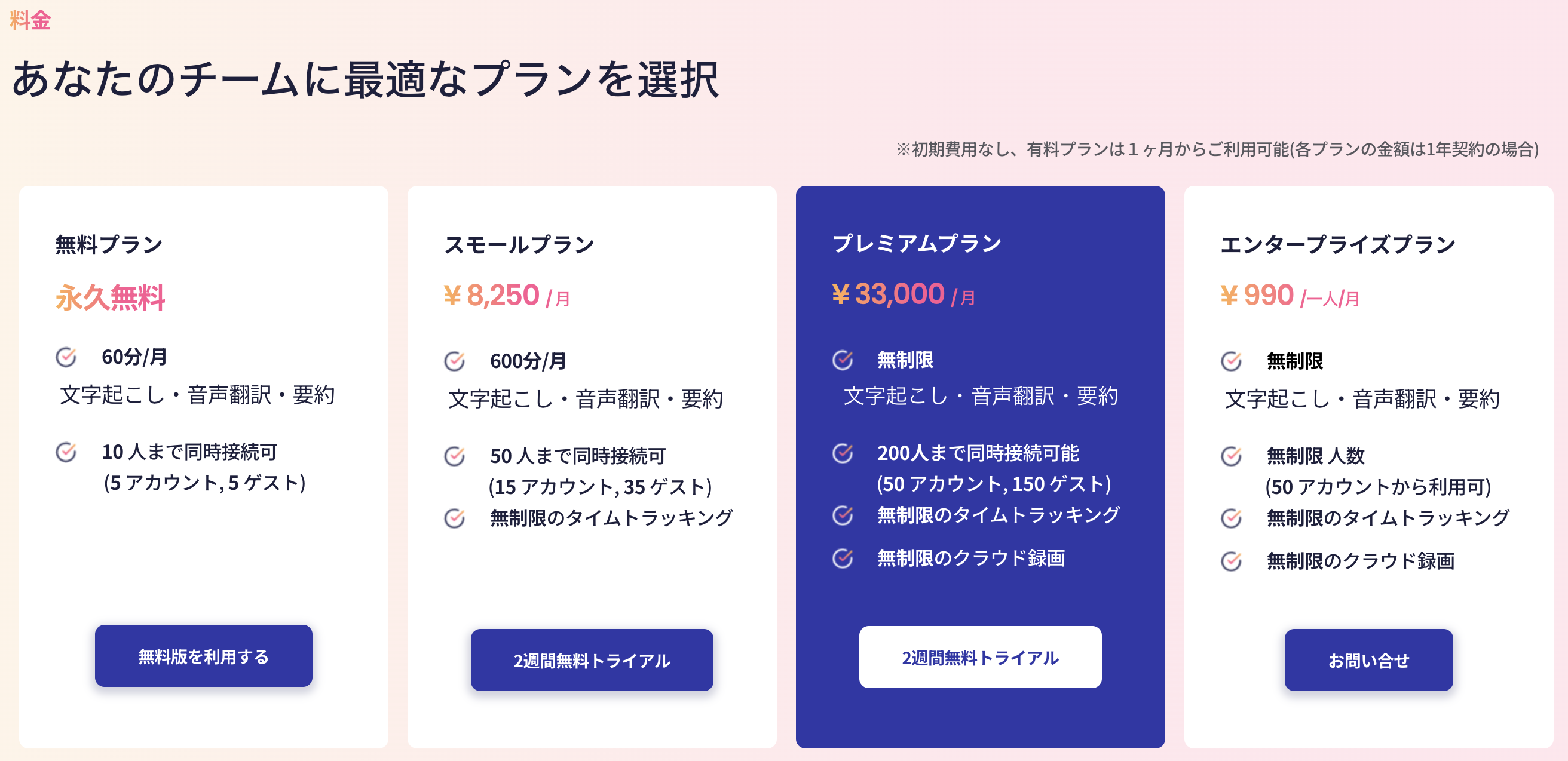
VoicePing’s English Meeting Minutes Features:
With high performance at low prices, VoicePing is recommended for those looking to streamline English meetings and meeting minutes creation.
#2: AI GIJIROKU
https://www.youtube.com/watch?v=b4u2uiL2l1w
AI GIJIROKU is an app that integrates with web conferencing systems. When connected to Zoom or Microsoft Teams for meetings, conversations are transcribed and translated in real-time. The display appears like movie subtitles, making it easy to focus on the web meeting.
AI GIJIROKU Features:
Recommended for those who frequently use technical terms and want to streamline meeting minutes creation.
| Item | Details |
|---|---|
| App Name | AI GIJIROKU |
| Type | Real-time Translation |
| Features | Punctuation, Transcription, Scheduling, Speaker ID, Timestamp, Recording, Audio Playback, Speed Playback, Silence Skip, Custom Vocabulary, Editing, Sharing, Export |
| Price | Personal: ¥16,500/year, Team: ¥327,800/year, Business: ¥2,200,000/year |
| Time Limit | Personal: 100 min/month, Team: 1,000 min/month, Business: 10,000 min/month |
#3: Notta
Notta is a meeting minutes app used by over 500 companies and 1 million users. It’s popular because it provides “recording,” “editing,” “summarization,” and “sharing” in one stop, making it easy for anyone to use. While it’s a very convenient app, since it translates recorded data afterward, it’s less suitable for smooth real-time meeting minutes creation.
Notta Features:
While translation happens after the fact, if everyone speaks English, it can speed up meeting minutes creation.
| Item | Details |
|---|---|
| App Name | Notta |
| Type | Data Translation |
| Features | Punctuation, Transcription, Scheduling, Speaker ID, Timestamp, Recording, Audio Playback, Speed Playback, Silence Skip, Custom Vocabulary, Editing, Sharing, Export |
| Price | Free: ¥0, Small: ¥8,250/month, Premium: ¥22,000/month |
| Time Limit | Free: 60 min, Small: 600 min, Premium: Unlimited |
#4: Texter
Texter is a voice input app developed by freelance engineer Yuichi Matsuoka. By integrating with DeepL, transcribed data can be converted into English, Chinese, and other languages.
Texter Features:
The lack of punctuation may leave some users wanting more for efficient meeting minutes creation.
| Item | Details |
|---|---|
| App Name | Texter |
| Type | Data Translation |
| Features | Punctuation, Transcription, Summarization, Recording, Audio Playback, Sharing, Export |
| Price | Premium M: ¥1,500/month, Premium M+: ¥3,000/month |
| Time Limit | Premium M: 3 hours/month, Premium M+: 10 hours/month |
#5: Group Transcribe
Group Transcribe is a voice input app provided by Microsoft. With real-time translation features, you can have smooth conversations even if you don’t understand the language the other person is speaking. The biggest attraction is that this app is completely free to use.
Group Transcribe Features:
The 30-minute session limit and lack of summarization features may be limitations. However, if you’re looking for a completely free app, this should satisfy your needs.
| Item | Details |
|---|---|
| App Name | Group Transcribe |
| Type | Real-time Translation |
| Features | Punctuation, Transcription, Speaker ID, Real-time Translation, Sharing, Export |
| Price | Completely Free |
| Time Limit | 30 min/session |
—
Best Web & Mobile Meeting Minutes Apps (4 Options)
1. Smart Shoki

*Source: https://lp.smartshoki.com/*
Smart Shoki is an AI meeting minutes service using voice recognition. It converts audio to text and creates meeting minutes for meetings, interviews, and presentations. Try Smart Shoki with a free trial!
Smart Shoki Features:
2. Otter.ai

*Source: https://otter.ai/*
Otter.ai is AI-based software that converts voice to text in real-time. Since English varies by country, Otter.ai supports various English accents. Try it with a free trial!
Otter.ai Features:
3. OnYaku

*Source: https://www.hitachi-solutions.co.jp/onyaku/*
OnYaku is a voice input app provided by HITACHI. It supports 110 languages beyond just English, making it ideal for diverse teams. Try it with a free trial!
OnYaku Features:
4. CLOVA Note

*Source: https://clovanote.line.me/*
CLOVA Note is a meeting minutes app that you log into with LINE. It can be easily used in a web browser, but iOS/Android mobile apps are also available. It supports multiple languages beyond English, including Chinese.
CLOVA Note Features:
—
Best Browser-Only Meeting Minutes Apps (3 Options)
1. Minutz

*Source: https://obot-ai.com/minutes/*
Minutz is a transcription and automatic translation app that requires no installation. With automatic translation in over 100 languages, it can handle corporate internationalization needs.
Minutz Features:
2. ZMEETING

*Source: https://www.zplatform.ai/*
ZMEETING is a meeting minutes tool that requires no installation. It supports multiple languages including English, Chinese, and Vietnamese.
ZMEETING Features:
3. Texta

*Source: https://texta.cloud/*
Texta is a browser-based transcription web app that requires no installation. It’s especially recommended for those who have frequent web meetings with international participants. Texta supports multiple languages including English, Chinese, and French.
Texta Features:
—
Best Mobile-Only Meeting Minutes Apps (3 Options)
1. Temi

*Source: App Store*
Temi allows easy voice transcription on mobile devices. You can record within the iOS/Android app or import audio files from other apps.
Temi Features:
2. Speechy Lite

*Source: App Store*
Speechy Lite is an iOS mobile app that converts voice to text. It also offers voice translation supporting over 88 languages. Additionally, the Speechy Lite app includes text translation, making it recommended for those who frequently communicate via text with diverse teams beyond just meetings.
Speechy Lite Features:
3. Rev

*Source: App Store*
Rev allows easy recording and transcription on mobile devices. You can record while using other apps, so you don’t need to keep the Rev app open constantly.
Rev Features:
—
Benefits of Using VoicePing for English Meeting Minutes

*Source: VoicePing*
There are three key benefits to using VoicePing for English meeting minutes.
Easier to Share Opinions in Meetings
Even people with high TOEIC scores of 800+ may struggle with “English meetings.” This is because when native speakers talk quickly, it becomes difficult to catch what they’re saying. This challenge can be solved with real-time translation.
Conversations can continue smoothly even when Japanese and English are mixed. As a result, participants find it easier to share their opinions.
Create Japanese and English Meeting Minutes Simultaneously
VoicePing allows you to export meeting minutes documents with a single button click. Before pressing the export button, simply select which language to create the document in, and the system will generate materials in that language. This makes it easy to create both Japanese and English meeting minutes.
Web-Based System with Recording and Video Capture
What makes VoicePing recommended is that as a web-based app, it can not only record conversations but also capture video of business discussions. Even with automated meeting minutes, fast speech may sometimes not be recognized properly. When such issues occur, having a recording and video allows you to review that section and correct the meeting minutes accordingly.
—
Conclusion
In this article, we’ve introduced English meeting minutes apps in a ranked format.
By using VoicePing, you can translate web meeting content in real-time. This allows even those who struggle with English to participate in meetings.
Additionally, with ChatGPT integration, VoicePing can summarize meeting key points, making meeting minutes creation more efficient. Despite these rich features, VoicePing offers affordable pricing that makes it easy to adopt. If this article has interested you in VoicePing, please try our free trial using the form below.
—
Tags: Meeting Minutes App, English Transcription, Real-time Translation, AI Meeting Notes, VoicePing